AMIGO Wiki
AI Managed Implementation Governance Office - Documentation
Introduction
Key Relationship
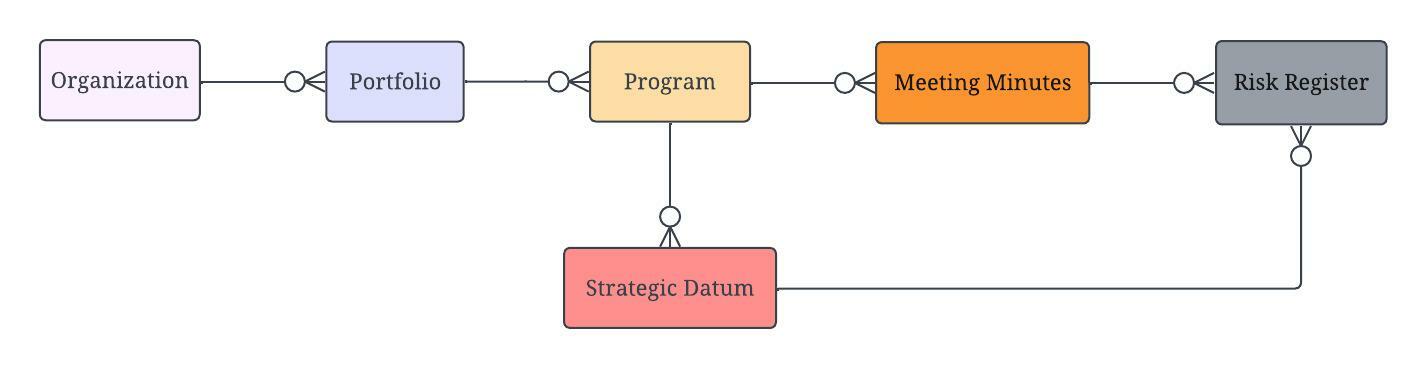
Important Field Dependencies
Object | Usage Notes | Visibility | Filter & Search Criteria -- | -- | -- | -- Hyperlink to Portfolio | Parent | | Hyperlink to Project | Child | | | | |Available Features
The features are implemented for associating the relationships of AMIGO Risk Register functionality.
Refer to the below image:

Add Project
Using the Add Project action button, users can assign Projects to our Risk because we can define all the projects that are potentially impacted by a particular risk.
Add Deliverable
Within those Projects, users can select all the deliverables using the Add Deliverable action button. They may be potentially impacted. And then what this is going to demonstrate is how big this risk can be in the overall impact of how much work or rework may occur as a result of this risk materializing. So it’s a really good indicator of your Program leadership. And then associate it to those deliverables are the objects. And what we won’t be able to do is document the corresponding objects that are going to be impacted by these risks. And we use this to drive our surgical communications through our aim, a messenger to let others who are also working and things around those objects of this upcoming risk. And what’s happening with that risk and how it’s being mitigated. So they have information about that.
RACI Chart
The RACI Chart can be added by using the RACI Chart action button in the page layout of the Risk Register. By adding RACI, it can be defined who’s responsible, who’s accountable, who needs to be consulted, and who needs to be informed about your risk.
Take Action
Once the RACI members have been added successfully, the user can perform some action on the Risk Register using the button Take Action.
Risk Register Dashboard
Risk Exposure
Open by Portfolio
Open by Program
Open by Project
Organization Risk Profile
By Status
Open by Classification
Open by Category
💼 Business Usage
PMO Application
The Risk Register in AMIGO supports proactive risk management throughout the program lifecycle. By documenting risks with clear ownership and linking them to impacted projects and deliverables, program teams can quantify potential impact and implement effective mitigation strategies.
Common Use Cases
- Risk Identification: Document potential risks during planning phases and ongoing execution
- Impact Assessment: Link risks to projects and deliverables to quantify potential impact
- Mitigation Planning: Assign RACI responsibilities for risk response activities
- Risk Monitoring: Track risk status through the approval workflow
- Stakeholder Communication: AI Messenger alerts affected teams about risk changes
Risk Management Process
| Stage | Description |
|---|---|
| Identify | Document the uncertain event or condition |
| Assess | Evaluate probability and impact |
| Plan Response | Define mitigation or contingency strategies |
| Assign Ownership | Set RACI responsibilities |
| Monitor | Track status and update as conditions change |
| Close | Document outcome when risk is resolved |
📚 References
- Governance - RAID management overview
- Scope Management - Project and deliverable management
- Risk Register Dashboard - Risk analytics