AMIGO Wiki
AI Managed Implementation Governance Office - Documentation
Introduction
Key Relationship
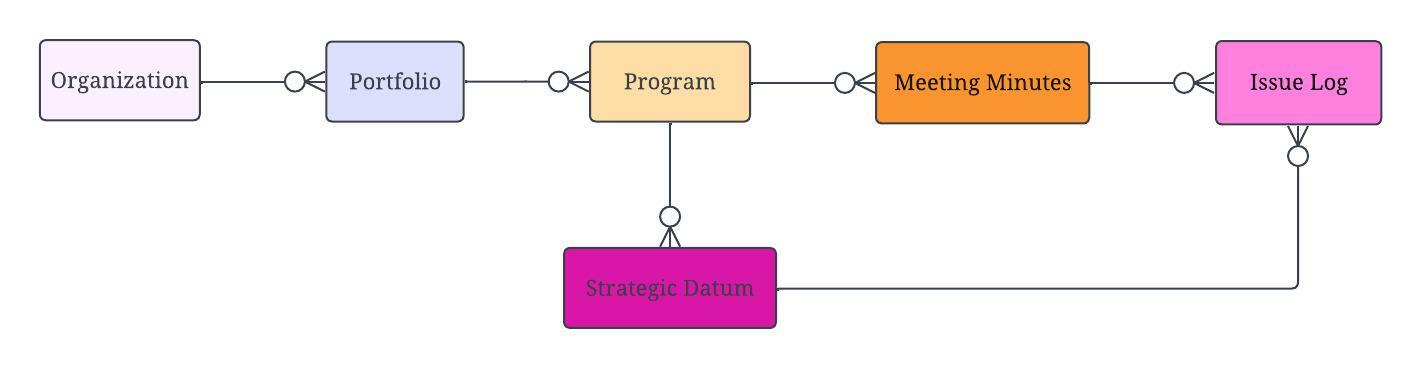
Important Field Dependencies
Object | Usage Notes | Visibility | Filter & Search Criteria -- | -- | -- | -- Hyperlink to Portfolio | Parent | | Hyperlink to Project | Child | | | | |Issue Log Dashboard
Open By Organization
Open By Portfolio
Open By Program
Open By Project
Open with Change Request
Open By Issue Owner
Open By Signoff Resource
Open on Critical Path
Open by Issue Coordinator
Open By Impact
Open By Object
💼 Business Usage
PMO Application
The Issue Log in AMIGO provides a structured mechanism for documenting and resolving issues that arise during program execution. Unlike risks (which may or may not occur), issues represent current problems that require immediate attention and resolution.
Common Use Cases
- Issue Documentation: Capture problems as they arise with full context
- Impact Analysis: Link issues to affected projects, deliverables, and objects
- Resolution Tracking: Assign ownership and track progress through resolution
- Escalation Management: Escalate critical issues to appropriate stakeholders
- Cross-Team Communication: AI Messenger notifies impacted teams automatically
Issue Management Process
| Stage | Description |
|---|---|
| Log | Document the issue with description and impact |
| Assess | Determine severity, priority, and affected areas |
| Assign | Set coordinator, owner, and sign-off responsibilities |
| Resolve | Implement solution and document resolution |
| Close | Obtain sign-off and close the issue |
Key Differentiators
- Risk vs. Issue: A risk is something that might happen; an issue has happened
- Object Linkage: Connect issues to specific objects for AI Messenger notifications
- Critical Path Flag: Identify issues impacting critical path activities
- Change Request Integration: Link issues that result in scope changes
📚 References
- Governance - RAID management overview
- Operational Readiness - Go-live issue management
- Issue Log Dashboard - Issue analytics