AMIGO Wiki
AI Managed Implementation Governance Office - Documentation
Introduction
Key Relationship
Important Field Dependencies
Object | Usage Notes | Visibility | Filter & Search Criteria -- | -- | -- | -- Hyperlink to Portfolio | Parent | | Hyperlink to Project | Child | | | | |Available features
Add Data Field
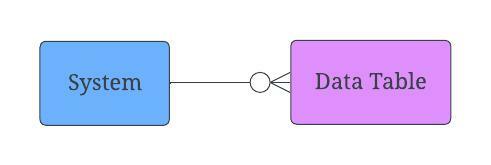
We have this System relationship because a System is going to be associated with one or many Data Tables and that Data Table is going to be associated with only one System. Within the Data Table itself, you’re going to have data fields and these are the individual types of data that you/the user want to store in your data table. Think about the columns in your spreadsheet. Those are our data fields. So, by using the Add Data Field button, Data Table can be associated with Data Fields.

💼 Business Usage
PMO Application
Data Tables define the structure of data entities within systems, capturing table names, descriptions, and relationships. They form the foundation for data mapping, migration planning, and integration design.
Common Use Cases
| Use Case | Description |
|---|---|
| System Documentation | Catalog tables across source and target systems |
| Migration Planning | Identify tables for data migration scope |
| Integration Design | Map tables between systems |
| Impact Analysis | Understand data dependencies |
| Data Dictionary | Maintain enterprise data definitions |
Table Attributes
- Table Name: Physical or logical name
- Description: Business purpose and content
- System: Parent system containing the table
- Record Count: Volume of data
- Sensitivity: Data classification level
Data Table Relationships
System
    └── Data Table
        └── Data Fields
            └── Data Mapping Rules
                └── Data Quality Rules
📚 References
- Data - Data management overview
- Data Fields - Field definitions
- Systems - Parent systems
- Data Mapping Rules - Mapping specifications